Topside
Your notch, finally useful.
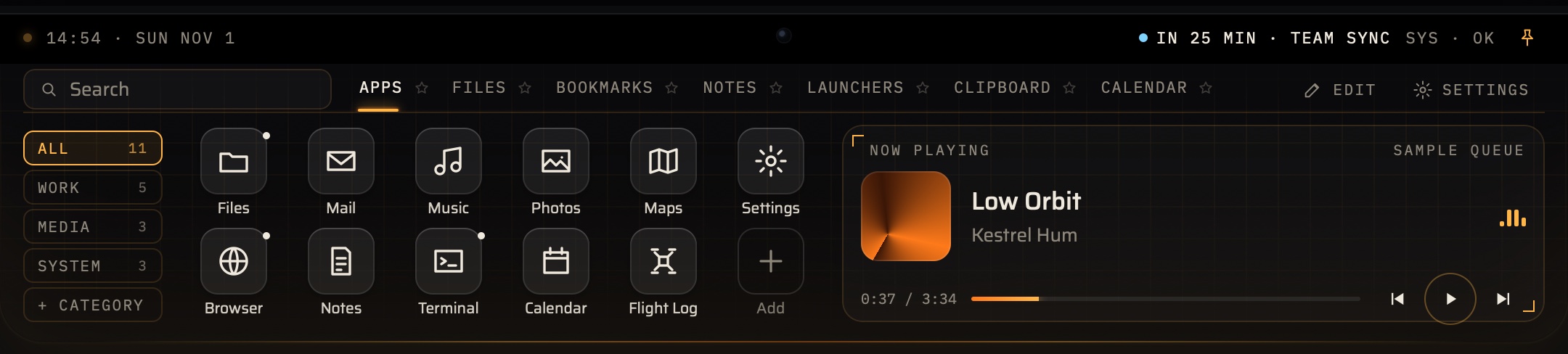
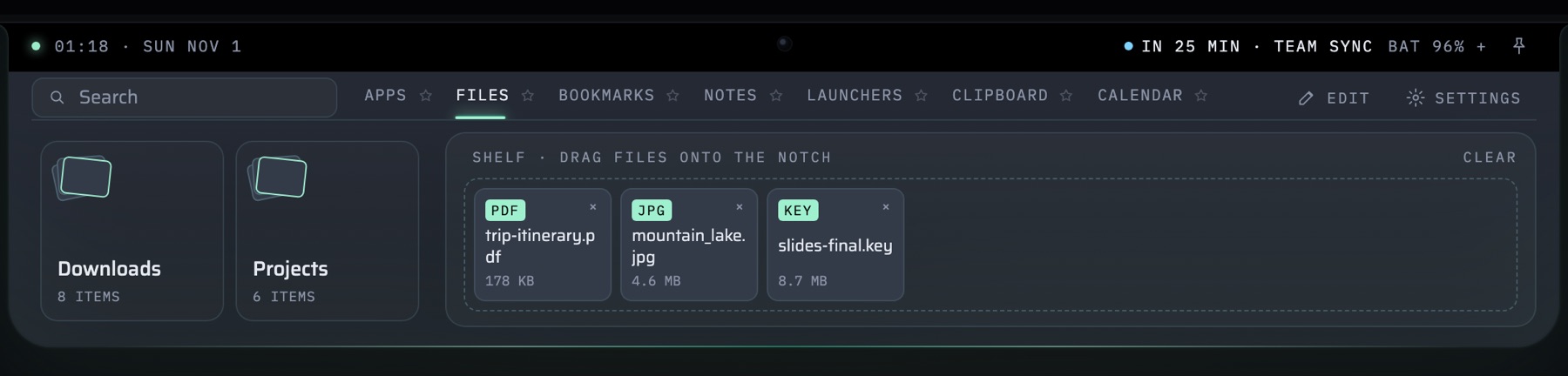
Push the pointer up into your MacBook’s notch and a wide panel slides out: your apps as live tiles, folder stacks and a file shelf, bookmarks, notes, a focus timer, media controls, and launchers that start your whole day in one click. Move away and it tucks back in. No notch? A thin glowing line at the top of the screen does the same job.
Screenshots
What it does
A dock in the notch
Push the pointer into the notch, or press ⌃⌥Space, and the panel slides out. Move away and it tucks back in. Click the notch to pin it open while you work.
Apps as live tiles
Your apps as small, wide or large live tiles, in your accent colour or each app’s own. Calendar and Music tiles flip over to show your next event or what’s playing.
Folder stacks and a file shelf
Open Downloads, Documents or any folder as a stack of recent files. Drag files up to the notch to park them on the shelf, then drag them off into Finder, Mail or anything else.
Bookmarks and notes
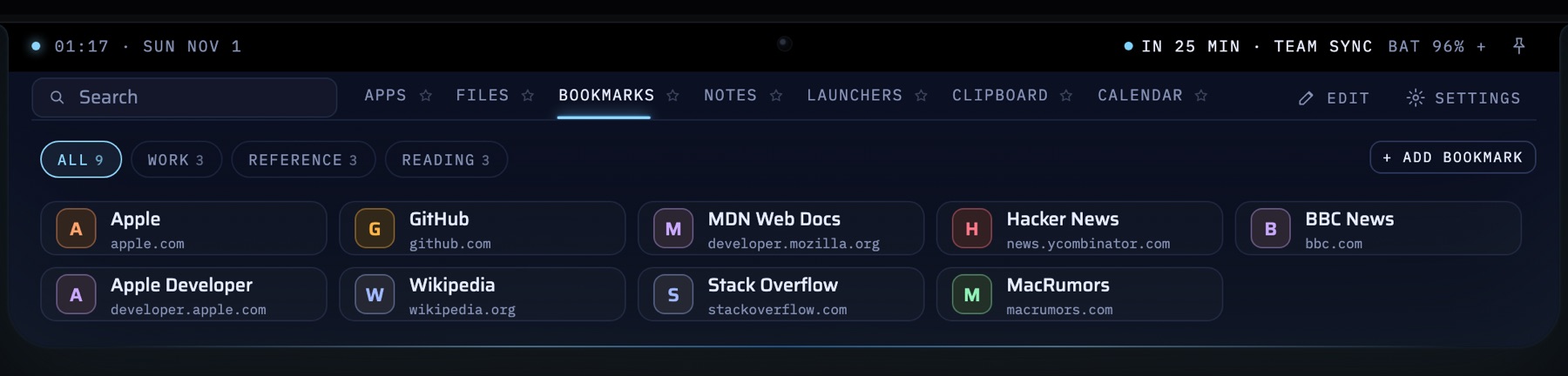
Bookmarks open in your default browser, sorted into groups you name, each with its site’s icon. Notes save as you type.
Launchers
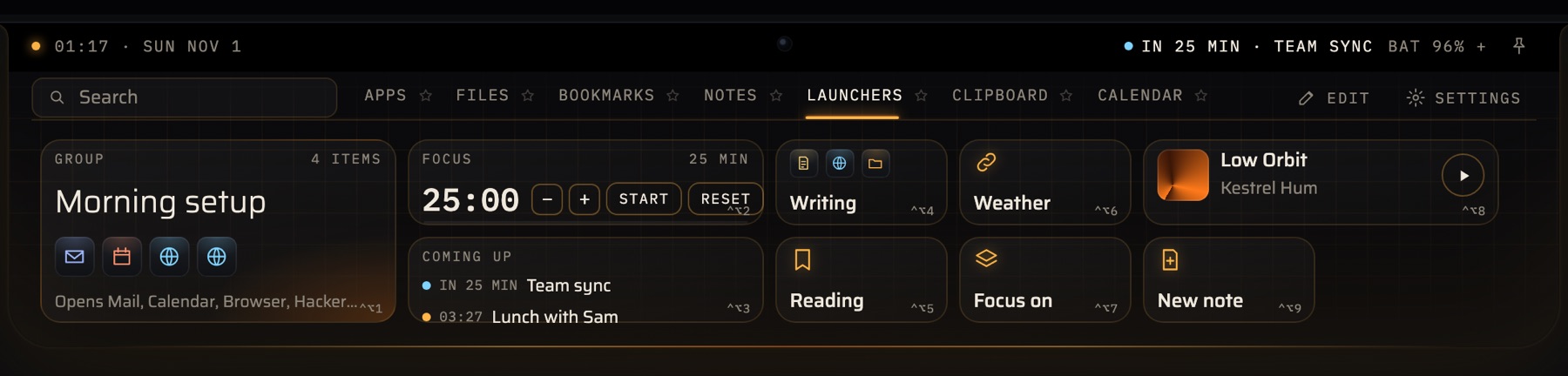
Tiles that open several apps, web pages, files and folders at once, in the order you set. Add a focus timer that counts down inside the closed notch, Now Playing, New note, and anything from the Shortcuts app.
Type to search
Start typing while Topside is open to find apps, launchers, bookmarks, folders and notes. Arrow keys to move, Return to open. Launcher tiles 1–9 also get their own ⌃⌥ shortcuts.
Clipboard and Calendar add-ons
Clipboard history keeps the last 50 things you copied, and Calendar shows the week ahead and adds events. Both are on from the start, and you can switch either off in Settings.
Make it yours
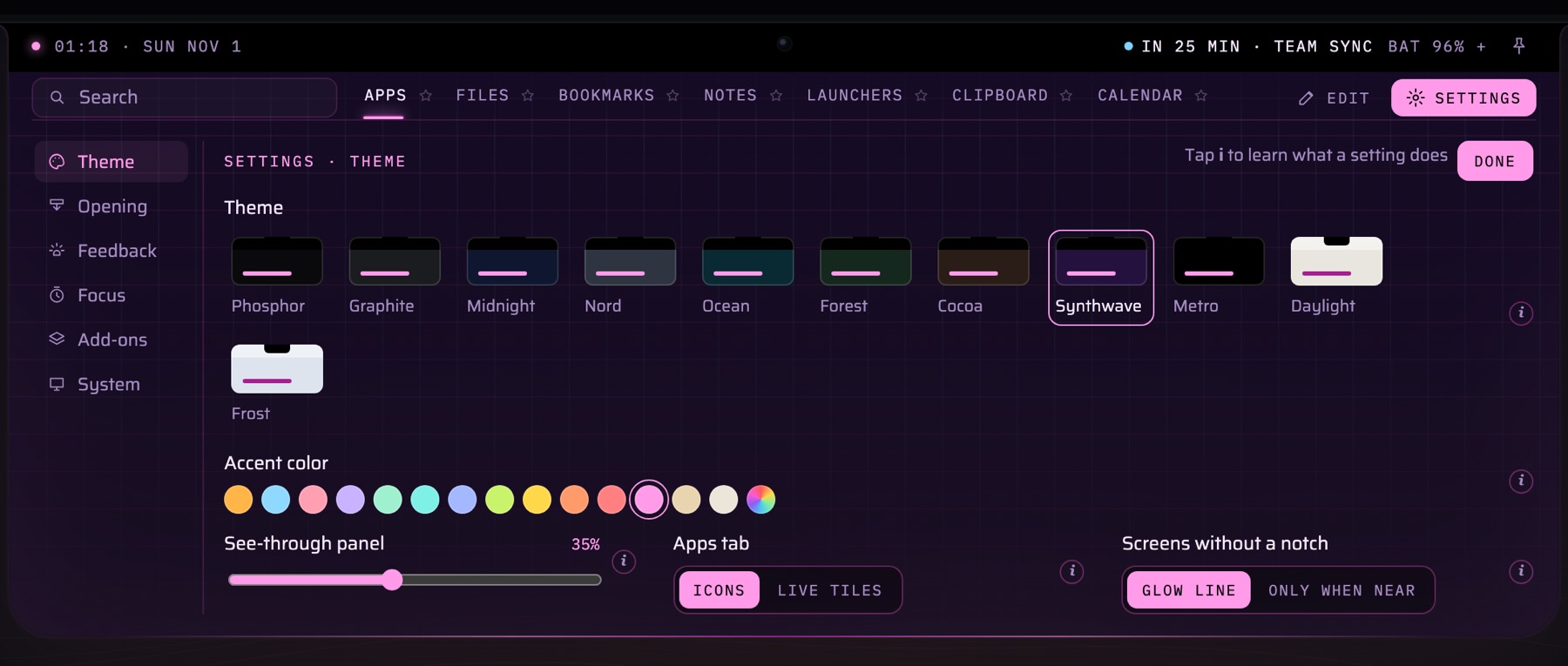
Eleven themes from Phosphor to Synthwave, including the light Daylight and Frost, fifteen accent colours or any colour you pick, and a see-through panel. The notch itself always stays black.
Notch or no notch
It reads your MacBook’s real notch size so it fits exactly. On an external display or a Mac without a notch, a thin glow line marks the top centre and brightens as the pointer comes near.
Pricing
Free
Free to download, with a few limits
- Up to 5 apps
- Up to 5 bookmarks
- Up to 5 launcher tiles
- 4 folder stacks and the file shelf
- 1 note
- 3 saved clipboard items
Topside Pro Upgrade
Everything in Free, with no limits
- Unlimited apps and bookmarks
- Unlimited launcher tiles
- Unlimited folder stacks
- Unlimited notes
- Unlimited saved clipboard items
Topside Pro is a one-time in-app purchase on the Mac App Store. Prices are in US dollars; the App Store shows the price in your local currency.
Privacy & Terms
No accounts, no analytics, no ads and no tracking. Your dock, bookmarks, notes and settings live only on your Mac, and NovakPlay never sees any of it.
Permissions
01Who we are
Topside is made by NovakPlay, an independent developer based in Edmonton, Alberta, Canada (the developer named on the App Store listing). This statement explains what the app does with your information.
02What we collect
Nothing. Topside has no accounts and no servers of ours, and contains no analytics, no advertising and no tracking. NovakPlay never receives your apps, files, bookmarks, notes, clipboard or any other information you use with the app.
03Where your data lives
Everything you set up — your dock, bookmarks, notes, launchers, settings and, if you switch it on, your clipboard history — is stored only on your Mac, in the app’s own container. If you use Export layout, Topside saves a JSON file wherever you choose; that file is yours and is never sent anywhere. Clipboard history is never included in exports. Deleting the app removes its data from your Mac.
04Clipboard history
Clipboard history is an add-on that is on when you first install Topside; you can switch it off at any time in Settings ▸ Add-ons. While it’s on, Topside keeps the last things you copy (up to 50, or 3 in the free version), on your Mac only. It skips anything password managers mark as private or concealed, and you can remove items or clear the history at any time.
05Calendar
The Calendar add-on is also on when you first install Topside, and you can switch it off in Settings ▸ Add-ons. Topside can only read your calendars if you allow it when macOS asks; if you don’t, the Calendar tab stays empty. With access, Topside uses it to show your upcoming events and to create the events you add. Your events never leave your Mac.
06Music and Spotify
To show and control what’s playing, Topside asks macOS for permission to talk to the Music and Spotify apps. When Spotify is playing, its album art is loaded from Spotify’s servers, as it would be in Spotify itself.
07Bookmark icons
To show a site’s icon next to a bookmark, Topside requests the icon from the site itself or from DuckDuckGo’s public icon service (icons.duckduckgo.com). This means DuckDuckGo receives the domain names of the public sites you bookmark, under DuckDuckGo’s privacy policy. Local and home-network addresses are never sent to DuckDuckGo.
08Files and folders
Topside reads only Downloads and the folders you pick, to list their recent files in your folder stacks. Files you drop on the shelf stay where they are on your Mac. Nothing is uploaded.
09Purchases
Topside Pro is processed by Apple through your App Store account. NovakPlay receives no payment details — only what Apple tells the app about whether Pro is unlocked.
10Children
Topside is not directed at children under 13 and does not knowingly collect their information. Age rating: 4+.
11Your rights
Because your data stays on your Mac, you are in control of it: you can edit or delete anything in the app, reset it from Settings, or delete the app to remove it all. For any privacy question or request under Canadian privacy law (PIPEDA), contact hello@novakplay.com.
12Changes
If this statement changes we’ll update it here and change the effective date above.
01The agreement
By downloading or using Topside, you agree to these terms. If you don’t agree, please don’t use the app. The agreement is between you and NovakPlay, the developer named on Topside’s App Store listing, based in Edmonton, Alberta, Canada.
02Your licence
NovakPlay grants you a personal, non-exclusive, non-transferable licence to use Topside on the Macs you own or control, for your own use, as permitted by the App Store’s usage rules.
03Topside Pro
Topside is free to download. Topside Pro is an optional one-time, non-consumable in-app purchase that removes the free version’s limits. It is not a subscription: there are no renewals, and it can be restored on your other Macs signed in with the same Apple account. The price is shown in the App Store and in the app before you buy, and payment is charged to your Apple account when you confirm the purchase.
04Refunds
All payments are handled by Apple, so refund requests go through Apple under its policies, at reportaproblem.apple.com.
05Apple’s standard EULA
Your use of Topside is also governed by Apple’s Licensed Application End User License Agreement. These terms add to it; where the two conflict, Apple’s standard EULA applies.
06Acceptable use
Please don’t reverse engineer, resell or redistribute the app except where the law expressly allows, and don’t use it to break the law or infringe anyone’s rights.
07Your content
Your bookmarks, notes, launchers and settings are yours. They are stored only on your Mac, which NovakPlay cannot access — so we can’t recover them for you if they are lost. Export layout makes a backup file; please keep your own copy of anything important.
08Other apps and services
Topside opens apps, web pages, files and Shortcuts that you choose, and works with Music, Spotify and Calendar. Those apps and services belong to others and are governed by their own terms; NovakPlay isn’t responsible for them.
09The app is provided “as is”
Topside is provided as is, without warranties of any kind. We work hard to make it reliable, but we can’t promise it will be uninterrupted, error-free or fit every purpose.
10Limitation of liability
To the fullest extent the law allows, NovakPlay is not liable for indirect, incidental or consequential damages arising from your use of the app, including lost data, and our total liability is limited to the amount you paid for the app in the twelve months before the claim.
11Governing law
These terms are governed by the laws of the Province of Alberta and the federal laws of Canada that apply there, without regard to conflict-of-laws rules.
12Contact
Questions about these terms? Email hello@novakplay.com.